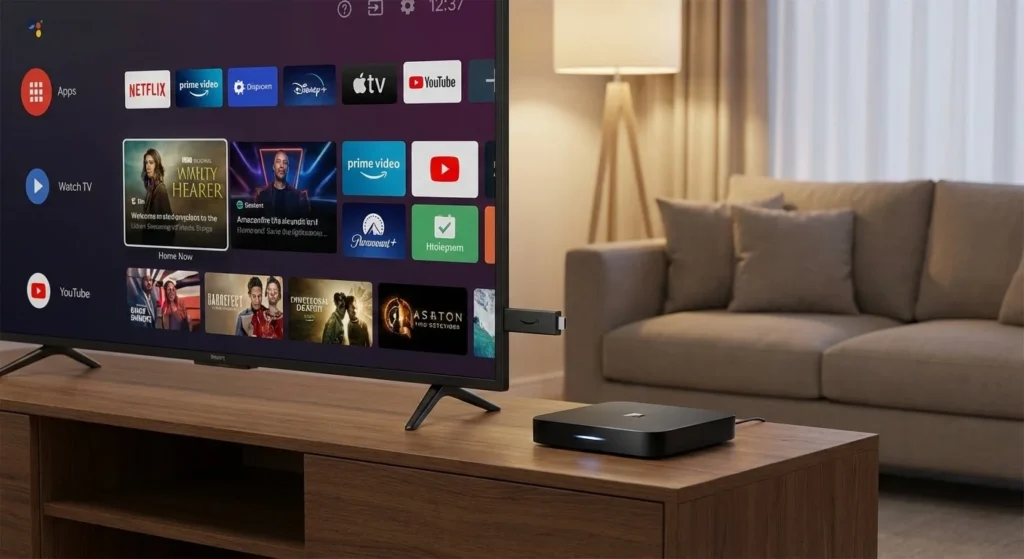
In the evolving world of home entertainment, the debate over Smart TV vs Firestick vs Android Box has never been more relevant. While most modern screens come with “smart” capabilities pre-installed, tech-savvy viewers often find themselves reaching for external devices to unlock better performance and more apps.
Whether you are looking to breathe new life into an aging television or want the most powerful home cinema experience, choosing the right hardware is essential. In this guide, we break down the hardware, software, and value propositions of each option to help you decide which is truly best for your setup.
What is a Smart TV?
A Smart TV is an all-in-one solution. It is a television set with an integrated operating system (OS) that allows you to stream content via Wi-Fi without any external hardware. Popular systems include LG’s webOS, Samsung’s Tizen, and Sony’s Google TV.
Pros:
- One Remote to Rule Them All: No need to switch inputs or manage multiple controllers.
- Clean Aesthetic: No dangling wires or extra boxes behind your TV.
- Integrated Features: Better integration with the TV’s specific picture and sound settings.
Cons:
- Slow Hardware: Manufacturers often use budget processors that become sluggish after a year or two.
- Limited Updates: Once a model is 3–4 years old, brands often stop providing OS updates, causing apps like Netflix or YouTube to stop working.
What is an Amazon Firestick?
The Amazon Firestick is a small, HDMI-based dongle that runs on Fire OS (a customized version of Android). It is designed to be affordable, portable, and deeply integrated with the Amazon Alexa ecosystem.
Pros:
- Price: Often the most affordable way to get 4K streaming.
- Portability: You can easily unplug it and take it to a hotel or a friend’s house.
- Alexa Voice Control: High-quality voice search for finding content across multiple apps.
Cons:
- Ad-Heavy Interface: The home screen is heavily cluttered with Amazon Prime ads and sponsored content.
- Restricted Ecosystem: While it runs on Android, it uses the Amazon Appstore, which has fewer apps than the standard Google Play Store.
What is an Android Box?
An Android Box (or Android TV Box) is a standalone hardware unit that connects via HDMI. These range from budget-friendly “pucks” like the Onn 4K Pro to powerhouse devices like the NVIDIA Shield TV Pro.
Pros:
- Ultimate Flexibility: Full access to the Google Play Store and the ability to “sideload” third-party apps (APKs).
- Performance: High-end boxes have significantly more RAM and better processors than any Smart TV.
- Longevity: You can upgrade the box every few years without having to buy a whole new television.
Cons:
- Extra Setup: Requires an additional power outlet and HDMI port.
- Variable Quality: Cheap, unbranded boxes can sometimes have security vulnerabilities or poor software support.
Smart TV vs Firestick vs Android Box: Comparison Table
| Feature | Smart TV | Amazon Firestick | Android TV Box |
| Setup | Built-in | Plug-and-Play | External Box |
| Operating System | webOS, Tizen, etc. | Fire OS | Google TV / Android TV |
| App Store | Brand Specific | Amazon Appstore | Google Play Store |
| Sideloading | Difficult/Impossible | Possible | Very Easy |
| Performance | Mid-to-Low | Consistent | High-End Options Available |
| Longevity | 2–5 Years | 2–4 Years | 5+ Years (for high-end) |
Key Performance Factors: Which One Wins?
When comparing Smart TV vs Firestick vs Android Box, you need to look at three main pillars: speed, app availability, and long-term value.
1. Speed and User Experience
If you hate “input lag,” an external Android Box is usually your best bet. Devices like the NVIDIA Shield or the latest Google TV Streamer are designed specifically for high-speed navigation. Smart TVs, by contrast, often prioritize the display panel over the internal computer, leading to frustrating delays when opening apps.
2. App Availability and Customization
This is where the Android Box shines. Because it uses the standard Google ecosystem, you get access to thousands of apps, including niche media players like Kodi and Plex. The Firestick is a close second, though its interface is very biased toward Amazon’s own services.
3. Longevity and Updates
The biggest flaw of a Smart TV is its “expiration date.” An external Firestick or Android Box solves this problem. When the software gets too heavy for the hardware, you can spend $30–$50 on a new stick rather than $500 on a new TV.
The 2025 Buyer’s Checklist: Smart TV vs Firestick vs Android Box
The “Set It and Forget It” Viewer
If you want the simplest experience with the fewest cables, the Smart TV remains the winner. Modern 2025 models from Sony (Google TV) or LG (webOS) are faster than ever. However, if your TV starts to lag, adding a Firestick or Android Box is a cheap way to fix it without buying a new screen.
The Amazon & Alexa Enthusiast
If your house is full of Echo Dots and Ring cameras, the Firestick (specifically the Fire TV Stick 4K Max) is your best bet. In the Smart TV vs Firestick vs Android Box debate, the Firestick wins for voice-controlled home automation. You can view your front door camera directly on your TV screen with a simple voice command.
The Power User and Cord-Cutter
For those who want the absolute best performance, the Android Box is the undisputed champion. Whether you are using the NVIDIA Shield TV Pro or the new Google TV Streamer, these devices handle high-bitrate 4K streaming and gaming better than any stick. When comparing Smart TV vs Firestick vs Android Box for “sideloading” apps or using IPTV, the Android Box offers the most freedom.
The Frequent Traveler
If you spend a lot of time in hotels, the Firestick is the clear winner. It’s small enough to fit in a pocket, and its “captive portal” support makes it easier to connect to hotel Wi-Fi than a bulky Android Box or a built-in Smart TV.
Do I need a Firestick if I have a Smart TV?
Not necessarily, but many people prefer it. If your Smart TV is older and the apps are lagging or crashing, adding a Firestick is a cheap way to upgrade the performance without replacing the entire screen. It also provides a better voice search experience via Alexa.
Is an Android Box better than a Firestick for 4K
For pure performance and customization, yes. While both support 4K, high-end Android Boxes often have better “upscaling” capabilities and more storage for large files. However, for casual users, the Firestick 4K Max provides excellent value and ease of use.
Can I watch live TV on these devices?
Yes, all three platforms support live TV apps like YouTube TV, Hulu + Live TV, and Sling. Android Boxes and Firesticks also allow you to install IPTV players, making them highly versatile for “cord-cutters” looking to replace traditional cable.
Final Verdict: Which Should You Choose?
- Choose a Smart TV if you want the simplest, most minimalist setup and only use mainstream apps like Netflix and Disney+.
- Choose a Firestick if you are on a budget, love using Alexa, and want a portable device that “just works.”
- Choose an Android Box if you are a power user who wants the fastest speeds, the most apps, and a device that will remain fast for years to come.
Ready to upgrade your viewing experience? Check out our latest Streaming Hardware Deals to find the best prices on the market today!